
Gadgets and Tech
7 min read
OBD2 Scanner vs Dealership Diagnostics: Pros & Cons
February 10 , 2026
By Zara Quinn
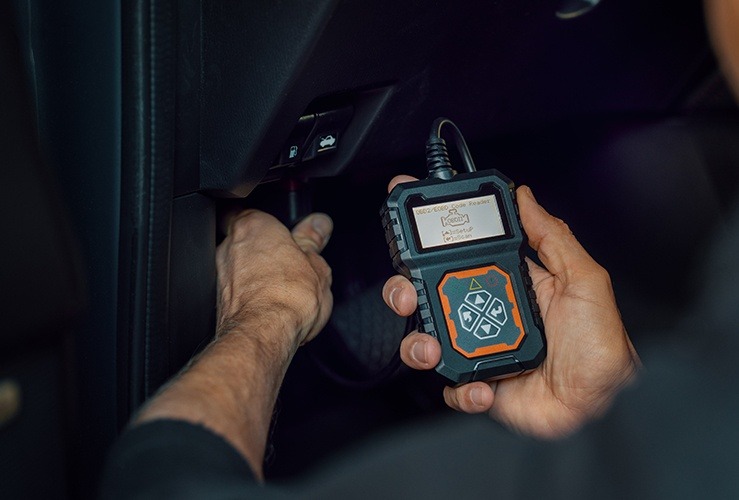
Modern vehicles are more technologically advanced than ever.
Modern vehicles are more technologically advanced than ever. This sophistication brings both convenience and complexity when it comes to diagnosing and fixing car issues. Vehicle owners and DIY enthusiasts often face a critical choice: should they rely on a professional dealership diagnostic or invest in an OBD2 scanner like Kingbolen for home use? This guide explores the pros and cons of each approach and provides a step-by-step introduction to using your Kingbolen OBD2 scanner for the first time.
Understanding Vehicle Diagnostics
Vehicle diagnostics involve the process of identifying issues within a car’s systems, primarily using the onboard computer called the ECU (Engine Control Unit). Modern vehicles have multiple ECUs that monitor everything from the engine and transmission to airbags and ABS brakes. When a problem arises, the vehicle generates diagnostic trouble codes (DTCs) stored in the ECU. These codes are used by mechanics and diagnostic tools to pinpoint the source of the problem.
What Is an OBD2 Scanner?
An OBD2 scanner is a portable device that connects to your car’s OBD2 port to read and interpret these trouble codes. Originally designed for professional use, these tools have become increasingly accessible to car owners. The Kingbolen OBD2 scanners, for example, provide advanced diagnostic features at a fraction of the cost of dealership services.
Key Features of OBD2 Scanners
- Reading & Clearing Codes: OBD2 scanners can read codes from the engine, transmission, ABS, SRS, and other modules and allow you to clear them.
- Live Data Monitoring: Many scanners, including Kingbolen models, display real-time data such as RPM, coolant temperature, and fuel trims.
- Reset Functions: Advanced models can reset maintenance lights, oil indicators, and even perform ABS/SRS resets.
- Portability & Convenience: Handheld scanners or Bluetooth-enabled versions can be used anywhere, eliminating the need for a dealership visit.
- Cost Efficiency: One-time purchase eliminates recurring diagnostic fees.
What Are Dealership Diagnostics?
Dealership diagnostics are professional services performed using proprietary tools and software that only certified dealerships or specialized repair shops typically have access to. These tools connect to all modules in the vehicle and offer manufacturer-specific functions.
Key Features of Dealership Diagnostics
- Comprehensive Access: Dealership tools provide access to all ECUs, including manufacturer-specific modules that consumer scanners cannot reach.
- Advanced Programming & Coding: Dealership tools can perform ECU coding, firmware updates, and advanced calibrations.
- Expertise & Support: A trained technician interprets the codes and can perform repairs immediately.
- Warranty Compliance: Repairs done at the dealership maintain manufacturer warranty conditions.
Pros and Cons: OBD2 Scanner vs Dealership Diagnostics
Understanding the strengths and limitations of each option is critical for deciding what works best for your needs.
Pros of Using an OBD2 Scanner
- Cost Savings: Purchasing a Kingbolen OBD2 scanner ranges from $50 to $200 depending on the model, while a dealership diagnostic session can cost $100-$200 per visit. Frequent use of an OBD2 scanner pays off quickly for car owners who want to monitor their vehicle regularly.
- Immediate Access: Instead of waiting for an appointment at the dealership, you can diagnose issues instantly.
- DIY Empowerment: Using a scanner helps you understand your vehicle better and can prevent unnecessary repairs.
- Portability: A handheld or Bluetooth OBD2 scanner can be used in multiple vehicles, making it ideal for families or small fleet owners.
- No Geographic Limitations: You can use the scanner wherever you are, whether at home, on a road trip, or in a remote location.
Cons of Using an OBD2 Scanner
- Limited Manufacturer-Specific Functions: While Kingbolen scanners offer many features, they may not perform advanced functions like ECU coding for all brands.
- Requires Some Knowledge: You must understand the codes and take appropriate actions. Incorrect handling could lead to further vehicle issues.
- No Hands-On Repair: The scanner can tell you what’s wrong, but it won’t perform repairs for you.
Pros of Dealership Diagnostics
- Complete Vehicle Coverage: Dealerships can access all systems and modules, including advanced features not available on general OBD2 scanners.
- Professional Expertise: Technicians can accurately diagnose complex issues, perform repairs, and provide advice based on extensive experience.
- Warranty Safety: Repairs done at authorized dealerships ensure your warranty remains valid.
- Advanced Repairs and Updates: Dealership tools can update software, recalibrate sensors, and reprogram ECUs, which consumer-grade scanners cannot do.
Cons of Dealership Diagnostics
- High Cost: Every visit comes with a fee, and repeated diagnostics can add up over time.
- Inconvenience: Scheduling appointments, traveling to the dealership, and waiting for service can be time-consuming.
- Limited Immediate Feedback: Unlike OBD2 scanners, you cannot diagnose issues instantly without a scheduled visit.
When to Choose an OBD2 Scanner
OBD2 scanners are ideal for:
- Routine vehicle monitoring
- DIY repairs
- Clearing minor faults or error codes
- Understanding what the dealership is recommending before paying
Kingbolen scanners are particularly useful for car enthusiasts and individuals who want a cost-effective and convenient diagnostic solution.
When to Choose Dealership Diagnostics
Dealership diagnostics are necessary when:
- Advanced ECU programming or coding is required
- Repairs are covered by the manufacturer warranty
- You encounter complex or unusual fault codes beyond the scanner’s capability
- You want professional confirmation before performing expensive repairs
How to Use a Kingbolen OBD2 Scanner for the First Time
Using a Kingbolen scanner for the first time is straightforward. Follow these steps to ensure accurate diagnostics:
Step 1: Locate Your OBD2 Port
The OBD2 port is usually located under the dashboard near the steering column. In most cars, it is easily accessible without tools. Consult your vehicle manual if necessary.
Step 2: Connect the Scanner
Plug the Kingbolen scanner into the OBD2 port. If using a Bluetooth-enabled model, pair the scanner with your smartphone or tablet using the Kingbolen app. Ensure the car ignition is turned on to allow communication.
Step 3: Power On the Scanner
Once connected, turn on the scanner or open the app. Most Kingbolen models automatically detect the vehicle and establish a connection.
Step 4: Read Diagnostic Trouble Codes (DTCs)
Navigate to the “Read Codes” or “Scan” function. The scanner will communicate with the ECU and display active and stored fault codes. Take note of these codes. Kingbolen scanners provide descriptions for each code, making it easier to understand the problem.
Step 5: Analyze Live Data (Optional)
Advanced Kingbolen scanners allow you to view live data, such as engine RPM, coolant temperature, and oxygen sensor readings. Use this data to monitor vehicle performance in real-time.
Step 6: Clear Codes (Optional)
After addressing the issue, you can clear the fault codes. Ensure that the underlying problem is resolved before clearing, as repeated clearing without repair may mask serious issues.
Step 7: Regular Monitoring
For optimal vehicle health, perform regular scans using your Kingbolen scanner. Monitoring trends in live data and DTC history can prevent major issues and save on repair costs.
Additional Tips for First-Time Users
- Read the Manual: Kingbolen scanners come with user guides specific to your model. Reading it ensures proper usage.
- Start with Simple Faults: Begin by diagnosing common codes such as oil light resets, ABS warnings, or check engine lights.
- Keep Software Updated: If your scanner has firmware updates, install them to access the latest vehicle models and features.
- Document Codes: Keep a log of codes and actions taken. This record can help future diagnostics and discussions with mechanics.
Cost Comparison: OBD2 Scanner vs Dealership
|
Feature |
Kingbolen OBD2 Scanner |
Dealership Diagnostics |
|
One-Time Cost |
$50–$200 |
$100–$200 per visit |
|
Accessibility |
At home or anywhere |
Requires dealership visit |
|
Speed |
Instant |
Appointment and wait time |
|
Repair Capability |
Provides codes, live data, and some resets |
Complete repair and ECU programming |
|
Knowledge Required |
Moderate |
Low (handled by technician) |
Over time, an OBD2 scanner becomes highly cost-effective for routine diagnostics, while dealership visits remain essential for complex or warranty-covered repairs.
Conclusion
Choosing between an OBD2 scanner and dealership diagnostics depends on your vehicle knowledge, needs, and budget. OBD2 scanners like Kingbolen empower car owners to monitor and maintain their vehicles efficiently, providing immediate feedback and reducing unnecessary costs. Dealership diagnostics remain indispensable for advanced repairs, warranty compliance, and professional assurance. Combining both approaches strategically allows car owners to maximize convenience, save money, and maintain vehicle performance effectively.
Investing in a Kingbolen OBD2 scanner is an excellent first step for anyone looking to take control of their car diagnostics, understand engine issues, and perform basic resets confidently. By following the simple steps outlined above, even first-time users can harness the power of modern diagnostic technology without the repeated cost of dealership visits.
live smarter
Shop smarter, live better, and stay ahead of the trends with our reliable recommendations!

Health and Beauty
1 min read
Health and Beauty Habits That Build Confidence, Glow, and a Healthy Lifestyle




trending
Gadgets and Tech
5 min read
How to Choose the Right Snapmaker 3D Printing Setup
Gadgets and Tech
6 min read
How to Choose the Right Keyboard for Better Typing and Productivity
Gadgets and Tech
2 min read
Gadgets and Tech Innovations That Shape Smart Living and the Digital Future
Gadgets and Tech
2 min read
Gadgets and Tech Innovations That Drive Smart Living and Digital Progress
Gadgets and Tech
2 min read